Force Feedback
Experimental
Force feedback testing is new and hasn't been tried on every force feedback device yet. If an effect doesn't behave as described on your stick, please report it with the device's name and the diagnostics report.
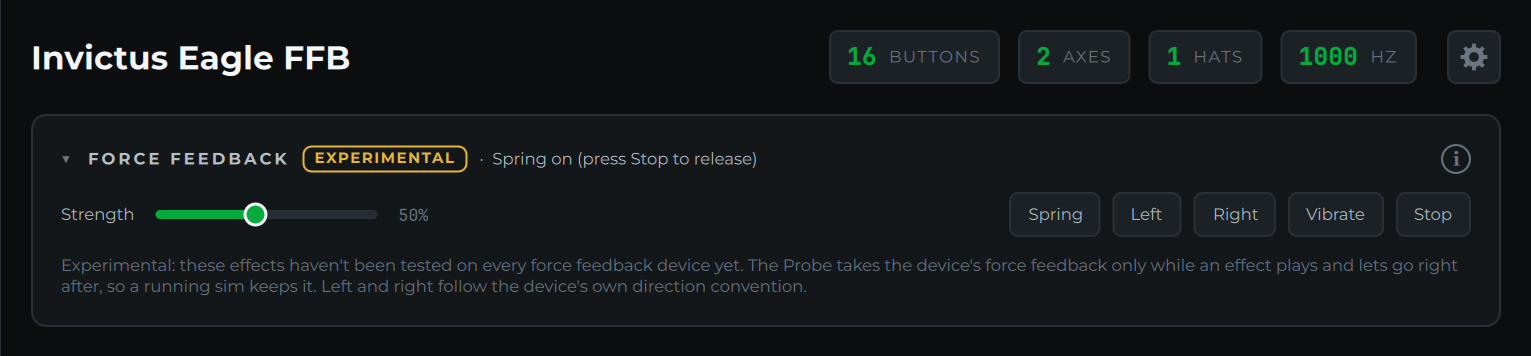
When the selected device supports force feedback, a Force Feedback card appears. Gamepads with rumble motors get a simpler Rumble card instead. Devices without either don't show the card at all.
Effects
- Spring: pulls the stick back to center, like a centering spring. It stays on until you press Stop.
- Left and Right: a short, steady push to one side. Which way counts as left follows the device's own direction convention, so on some sticks the two may be swapped.
- Vibrate: a one-second vibration.
- Stop: stops every effect and lets go of the device.
Strength sets how hard each effect is, from 10% to 100%. Start low on a strong base.
Using it alongside a sim
To play an effect, the Probe has to take the device's force feedback for itself, which would stop a sim from using it. So it only holds the device while an effect is playing and lets go the moment the effect ends or you press Stop. If the card says it couldn't open force feedback, another program (usually the sim) is using it; close that program or stop its force feedback, then try again.