Settings
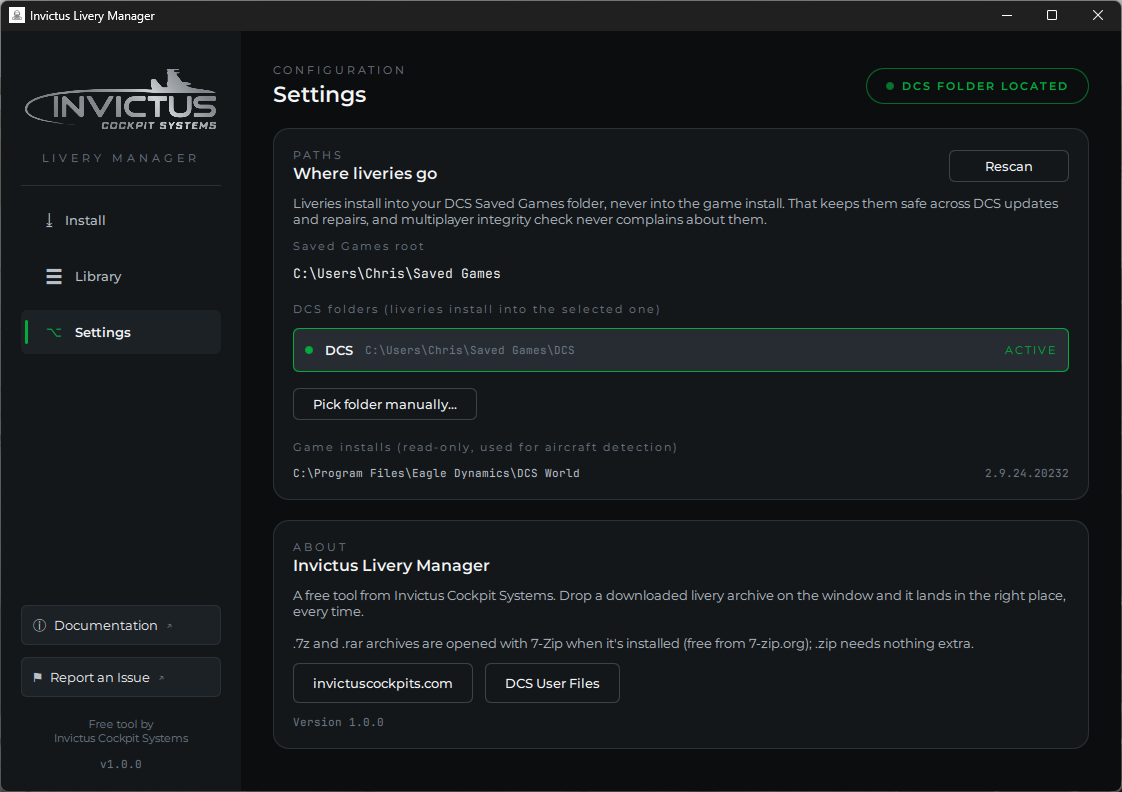
Where liveries go
The manager finds your DCS Saved Games folder automatically, including a
relocated Saved Games and machines that still have both a DCS and a
DCS.openbeta folder from before Eagle Dynamics merged the two branches.
Every folder found is listed; liveries install into the one marked ACTIVE.
Click another row to switch.
The pill in the top-right corner mirrors this state everywhere in the app: green DCS FOLDER LOCATED when a folder is selected, yellow DCS NOT FOUND when the scan came up empty. Clicking it brings you here.
When DCS isn't found
Two common reasons:
- DCS has never been launched on this PC. The game creates its Saved Games folder on first launch; run DCS once, then click Rescan.
- Your Saved Games folder lives somewhere unusual (moved to another
drive, portable setup). Click Pick folder manually... and select your
DCS user folder, the one that contains
Config,Logs, and (eventually)Liveries, usually calledDCS. The manager remembers your choice; Forget manual folder undoes it.
Game installs
Below the Saved Games section the manager lists any DCS game installations it found (standalone or Steam), with the game version where available. These are read-only for livery installs; only the VR Passthrough page's Lighting Engine ever writes into the game install, with backups. They're used to detect which aircraft modules you own, so the aircraft picker on the Install page knows the correct livery folder name for every module, even one released after this version of the manager.