ATC for DCS (beta)
What you'll do: add the ATC for DCS plugin, start its engine, connect it to DCS and set your push-to-talk switch, so a tower answers your radio calls by voice.
ATC for DCS is a tower that hears you and answers, from start-up to shutdown: taxi, takeoff, the pattern, landing and the way back to parking. It follows the real radio protocol, so it expects readbacks and corrects a wrong one. It runs on your own PC. Nothing you say is sent to the internet.
[!NOTE] ATC for DCS is in beta. It works, and we fly with it, but it will get things wrong. Tell us what it gets wrong with Report an Issue in the manager's sidebar. It is for DCS World only: it doesn't work with Falcon BMS yet.
Before you begin
- Cockpit Manager 2.8.0 or newer. See Update the Manager.
- The DCS integration is installed. See Set Up DCS.
- A microphone that Windows uses as its default recording device.
- A button to hold while you talk: a switch on your throttle or stick, or a key on the keyboard.
We have flown it in the F-16C. Other aircraft are not checked yet.
Steps
1. Add the plugin
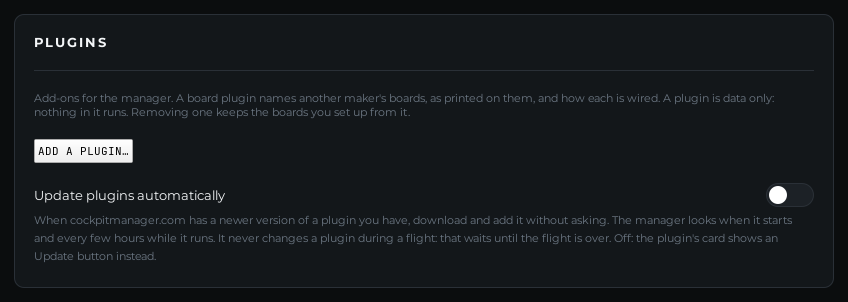
Open Settings and scroll to PLUGINS. Click ADD A PLUGIN….
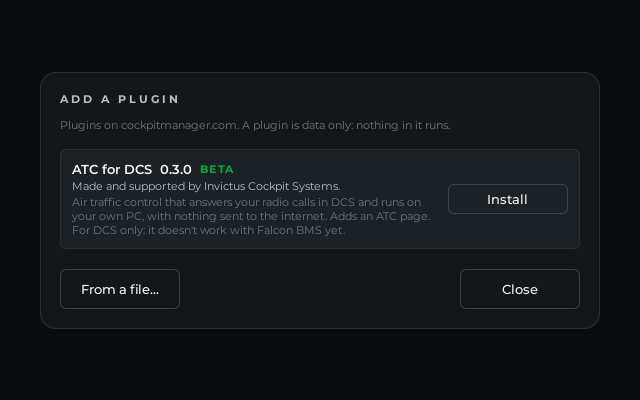
The window lists the plugins on cockpitmanager.com. Click Install next to ATC for DCS.
The plugin now has a card under PLUGINS, and an ATC page shows in the sidebar.
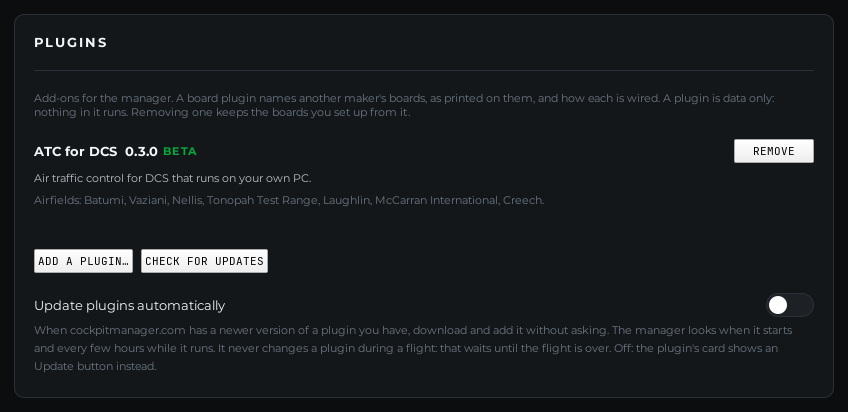
[!TIP] CHECK FOR UPDATES looks for a newer version of the plugin. Update plugins automatically adds a newer version without asking. It is off until you switch it on, and it never changes a plugin during a flight.
2. Start the engine
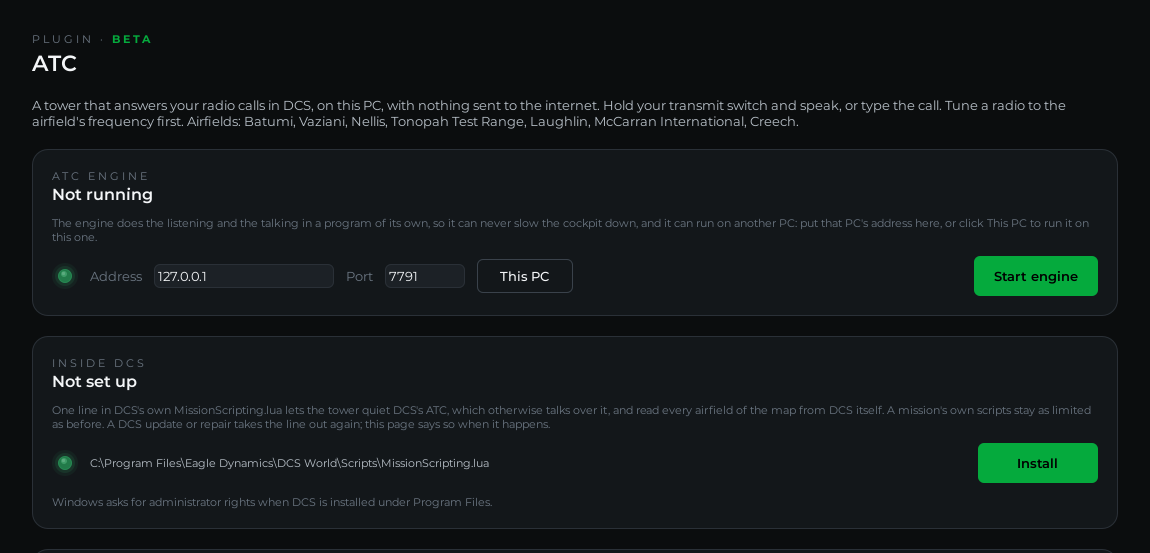
Open the ATC page. The engine is the part that listens and talks. It is a program of its own, so it can never slow your cockpit down. It comes with the manager, speech model and voices included, so there is nothing more to download.
Leave Address and Port as they are and click Start engine. The card changes to Running.
3. Connect it to DCS
On the INSIDE DCS card, click Install. Windows asks for administrator rights when DCS is installed under Program Files.
This adds one line to DCS's own Scripts\MissionScripting.lua, in the folder DCS is installed in. With it the tower can:
- read every airfield of the map you fly from DCS itself,
- see the other aircraft, so it can keep the runway clear for you,
- quiet DCS's own ATC, which otherwise talks over it.
A mission's own scripts stay as limited as they were. The manager keeps a copy of the file as it was, and Remove takes the line out again.
Start a mission, or restart the one you are in: a mission picks the line up when it loads. The card then reads Connected to this mission.
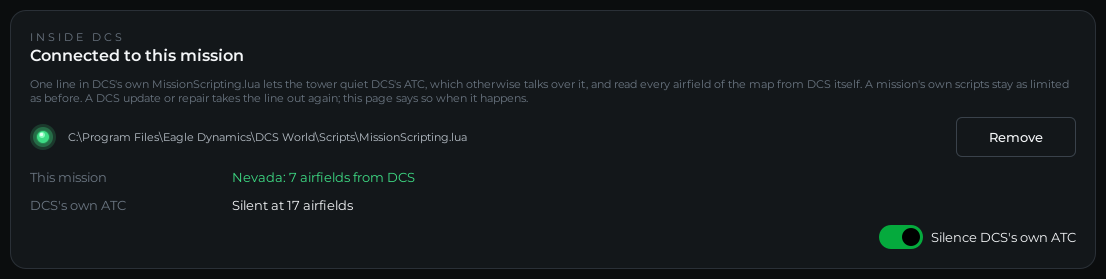
[!NOTE] A DCS update or repair takes the line out again. The card then reads Not set up. Click Install once more.
If the card reads DCS not found on this PC, click Set folder… and choose your main DCS folder, the one that holds the Mods and bin folders.
4. Set your push-to-talk switch
On the YOUR VOICE card, click Set a switch on the Push-to-talk, UHF row, then press the button on your throttle or stick that you want to hold while you talk on the UHF radio. Do the same for VHF if your jet has a second radio. Set a key takes a keyboard key instead.
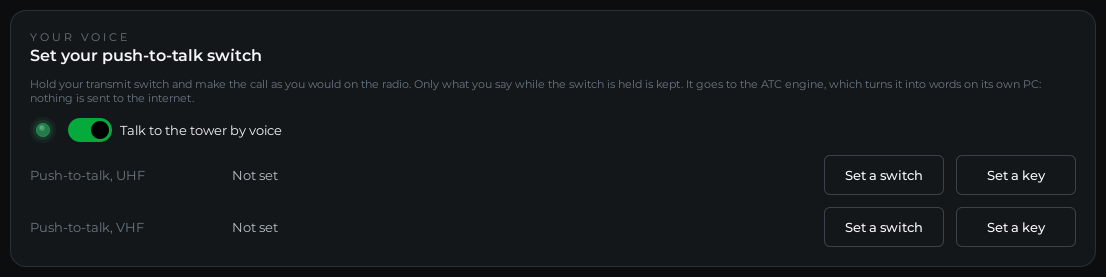
Only what you say while the switch is held is kept. The engine turns it into words on your own PC.
5. Check the tower's voice
Under Tower voice, leave Speak the replies on and click Test. The tower says one line. Set Volume by it. The replies play on Windows' default sound device.
6. Fly
Tune a radio to the tower's frequency, hold your push-to-talk switch, and make the call as you would on the radio. A tower answers within 49 nautical miles of its airfield.
The WHAT THE TOWER SEES card names the airfield you are at or nearest to, the frequencies its tower answers on, and whether one of your radios is on one of them.
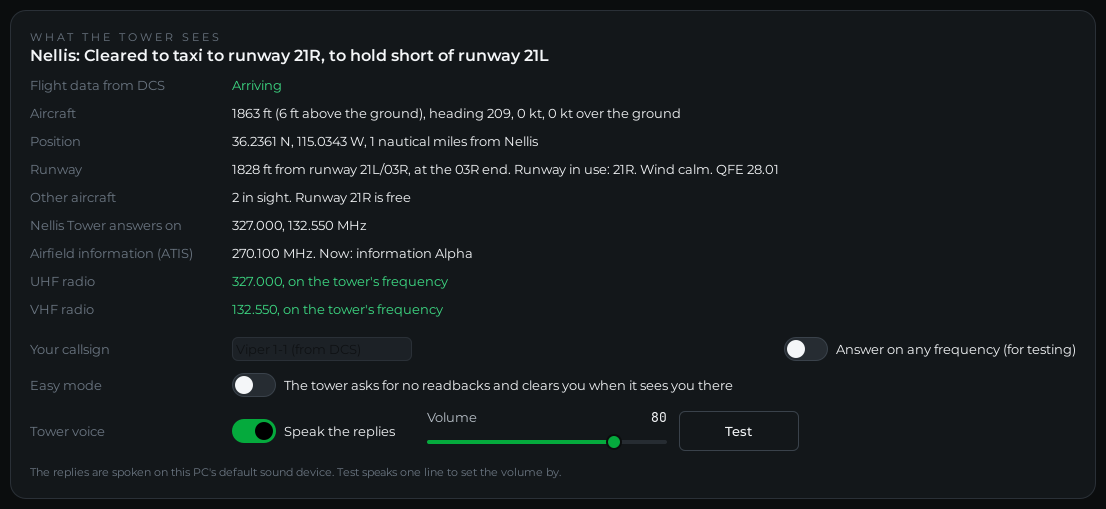
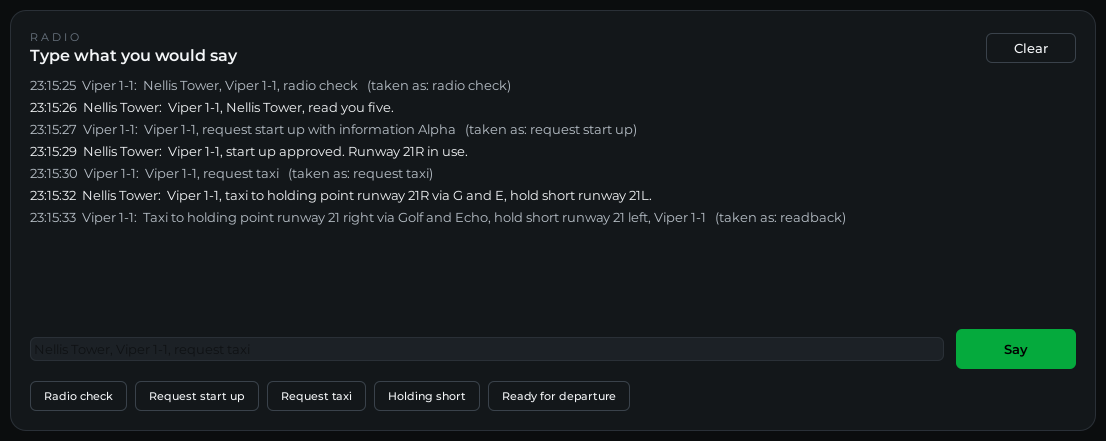
No microphone, or want to try a call first? The RADIO card takes typed calls, and keeps a list of everything said, with what the tower took each call as.
Check it worked
Sit in the jet on the ramp, with a radio on the tower's frequency. Hold your switch and say:
"Batumi Tower, Viper 1-1, radio check."
The tower answers "Viper 1-1, Batumi Tower, read you five." Your callsign comes from DCS; the Your callsign box on the page shows it, and you can type another.
How a flight goes
These are the tower's own words. The examples use Batumi, runway 13, with a light wind. Taxiway letters are written here as the page shows them (W) and spoken by their names (Whiskey).
Out
| You | The tower |
|---|---|
| "Batumi Tower, Viper 1-1, radio check." | "Viper 1-1, Batumi Tower, read you five." |
| "Viper 1-1, request start up." | "Viper 1-1, start up approved. Runway 13 in use, wind 120 degrees 5 knots, QFE 29.81." |
| "Start up approved, QFE 29.81, Viper 1-1." | Nothing. A right readback needs no answer. |
| "Viper 1-1, request taxi." | "Viper 1-1, taxi to holding point runway 13 via W." |
| "Taxi to holding point runway 13 via Whiskey, Viper 1-1." | Nothing. |
| "Viper 1-1, holding short runway 13, ready for departure." | "Viper 1-1, wind 120 degrees 5 knots, runway 13, cleared for takeoff." |
| "Cleared for takeoff runway 13, Viper 1-1." | Nothing. |
| You are airborne and clear of the airfield. | "Viper 1-1, frequency change approved, good day." |
Back, straight in
| You | The tower |
|---|---|
| "Batumi Tower, Viper 1-1, 20 miles north, inbound for landing." | "Viper 1-1, Batumi Tower, runway 13 in use, wind 120 degrees 5 knots, QFE 29.81, make straight in, report 5 mile final." |
| "Runway 13, QFE 29.81, straight in, will report 5 mile final, Viper 1-1." | Nothing. |
| "Viper 1-1, 5 mile final, gear down." | "Viper 1-1, runway 13, cleared to land." |
| "Cleared to land runway 13, Viper 1-1." | Nothing. |
| Your landing roll is over. | "Viper 1-1, taxi to parking via D." |
| "Taxi to parking via Delta, Viper 1-1." | Nothing. |
| "Viper 1-1, shutting down." | "Viper 1-1, roger, good day." |
Back, the overhead break
| You | The tower |
|---|---|
| "Batumi Tower, Viper 1-1, 15 miles north, inbound for the overhead." | "Viper 1-1, Batumi Tower, runway 13 in use, wind 120 degrees 5 knots, QFE 29.81, report initial." |
| "Viper 1-1, initial." | "Viper 1-1, break approved, report base." |
| "Viper 1-1, base, gear down." | "Viper 1-1, runway 13, cleared to land." |
A runway on your way
Where your taxi route crosses another runway, the tower holds you short of it and clears you across when you report there. At Nellis, parked on the east side:
| You | The tower |
|---|---|
| "Viper 1-1, request taxi." | "Viper 1-1, taxi to holding point runway 21R via G and E, hold short runway 21L." |
| "Taxi to holding point runway 21 right via Golf and Echo, hold short runway 21 left, Viper 1-1." | Nothing. |
| "Viper 1-1, holding short runway 21 left." | "Viper 1-1, cross runway 21L." |
Readbacks
Say back what the tower gives you: the runway, the taxi route, the pressure, a clearance, and above all "hold short". A right readback gets no answer. A wrong one is corrected:
| You | The tower |
|---|---|
| "Runway 31, will report 5 mile final, Viper 1-1." | "Viper 1-1, negative, runway 13." |
| "Runway 13, Viper 1-1." | Nothing. |
When the tower can't make out a call, it says "say again".
The tower gives the pressure as QFE: with it set, your altimeter reads zero on the runway. It is said figure by figure, "two niner decimal eight one".
Other calls it understands
| You | The tower |
|---|---|
| "Batumi Tower, Viper 1-1." | "Viper 1-1, Batumi Tower, go ahead." |
| "Viper 1-1, request wind check." | "Viper 1-1, runway 13 in use, wind 120 degrees 5 knots, QFE 29.81." |
| "Viper 1-1, say again." | The last thing it said, again. |
| "Viper 1-1, request touch and go." | "Viper 1-1, runway 13, cleared touch and go." |
| "Viper 1-1, request low approach." | "Viper 1-1, runway 13, cleared low approach." |
| "Viper 1-1, request closed traffic." | "Viper 1-1, closed traffic approved, report base." |
| "Viper 1-1, going around." | "Viper 1-1, roger, report base." |
| "Mayday mayday mayday, Viper 1-1, engine failure." | "Viper 1-1, roger mayday, wind 120 degrees 5 knots, QFE 29.81, runway 13, cleared to land." |
| "Viper 1-1, request transition through your airspace." | "Viper 1-1, Batumi Tower, transition approved, report clear." |
| "Viper 1-1, request frequency change." | "Viper 1-1, frequency change approved, good day." |
With the mission connected (step 3), the tower sees the other aircraft. It holds your takeoff or landing clearance while the runway is taken, and sends you around when it has to.
Easy mode
Easy mode on the ATC page is for learning the calls. With it on, the tower asks for no readbacks and clears you when it sees you there. It is off until you switch it on.
ATIS
DCS has no recorded airfield information on these maps, so the plugin broadcasts its own at the airfields below. It plays over and over on its own frequency, in a machine voice, to a radio that is on and tuned to it:
"Nellis information Alpha. Wind 250 degrees 8 knots. QFE 28.01. Runway 21R in use. Advise on initial contact you have information Alpha."
The letter moves on (Bravo, Charlie) when the runway, the wind or the pressure has changed enough to matter.
| Map | Airfield | ATIS frequency |
|---|---|---|
| Nevada | Nellis | 270.100 MHz |
| Nevada | McCarran International | 132.400 MHz |
| Nevada | Laughlin | 119.825 MHz |
Tell the tower which information you have, and it does not give you the wind and the pressure again:
| You | The tower |
|---|---|
| "Viper 1-1, request start up with information Alpha." | "Viper 1-1, start up approved. Runway 21R in use." |
Say no letter, or an old one, and the tower gives them to you as before. The ATIS frequency only broadcasts: nobody answers a call made on it.
Maps and airfields
The tower answers at every airfield of the map that DCS gives a tower frequency, on your side or neutral. The other side's towers don't answer. The frequencies are DCS's own, the same ones the map's charts show.
We have flown it on the Caucasus and Nevada maps. It reads each map from DCS itself, so it may answer on other maps too, but those are not checked yet.
The tower gives a taxi route by taxiway letter at Batumi, Vaziani, Nellis, Tonopah Test Range and Laughlin. At the other airfields it clears you to the holding point and leaves the way to you.
Caucasus
| Airfield | The tower's name | UHF | VHF | FM | HF |
|---|---|---|---|---|---|
| Anapa-Vityazevo | Anapa Tower | 250.000 | 121.000 | 38.400 | 3.750 |
| Batumi | Batumi Tower | 260.000 | 131.000 | 40.400 | 4.250 |
| Beslan | Beslan Tower | 270.000 | 141.000 | 42.400 | 4.750 |
| Gelendzhik | Gelendzhik Tower | 255.000 | 126.000 | 39.400 | 4.000 |
| Gudauta | Gudauta Tower | 259.000 | 130.000 | 40.200 | 4.200 |
| Kobuleti | Kobuleti Tower | 262.000 | 133.000 | 40.800 | 4.350 |
| Krasnodar-Center | Krasnodar Tower | 251.000 | 122.000 | 38.600 | 3.800 |
| Krasnodar-Pashkovsky | Pashkovsky Tower | 257.000 | 128.000 | 39.800 | 4.100 |
| Krymsk | Krymsk Tower | 253.000 | 124.000 | 39.000 | 3.900 |
| Kutaisi | Kutaisi Tower | 263.000 | 134.000 | 41.000 | 4.400 |
| Maykop-Khanskaya | Khanskaya Tower | 254.000 | 125.000 | 39.200 | 3.950 |
| Mineralnye Vody | Minvody Tower | 264.000 | 135.000 | 41.200 | 4.450 |
| Mozdok | Mozdok Tower | 266.000 | 137.000 | 41.600 | 4.550 |
| Nalchik | Nalchik Tower | 265.000 | 136.000 | 41.400 | 4.500 |
| Novorossiysk | Novorossiysk Tower | 252.000 | 123.000 | 38.800 | 3.850 |
| Senaki-Kolkhi | Kolkhi Tower | 261.000 | 132.000 | 40.600 | 4.300 |
| Sochi-Adler | Sochi Tower | 256.000 | 127.000 | 39.600 | 4.050 |
| Soganlug | Soganlug Tower | 268.000 | 139.000 | 42.000 | 4.650 |
| Sukhumi-Babushara | Sukhumi Tower | 258.000 | 129.000 | 40.000 | 4.150 |
| Tbilisi-Lochini | Lochini Tower | 267.000 | 138.000 | 41.800 | 4.600 |
| Vaziani | Vaziani Tower | 269.000 | 140.000 | 42.200 | 4.700 |
No ATIS on the Caucasus map yet.
Nevada
| Airfield | The tower's name | UHF | VHF | ATIS |
|---|---|---|---|---|
| Creech | Creech Tower | 360.600 | 118.300 | |
| Henderson Executive | Henderson Tower | 125.100 | ||
| Laughlin | Bullhead Tower | 123.900 | 119.825 | |
| McCarran International | Las Vegas Tower | 257.800 | 119.900 | 132.400 |
| Nellis | Nellis Tower | 327.000 | 132.550 | 270.100 |
| North Las Vegas | North Las Vegas Tower | 360.750 | 125.700 | |
| Tonopah Test Range | Silverbow Tower | 257.950 | 124.750 |
DCS gives no tower frequency for the other Nevada airfields (Beatty, Boulder City, Echo Bay, Groom Lake, Jean, Lincoln County, Mesquite, Mina, Pahute Mesa and Tonopah), so no tower answers there.
All frequencies are in MHz.
If something's wrong
When nobody answers, the RADIO card says why, in a line of its own.
| Problem | Fix |
|---|---|
| "Nobody answered: no radio is on a Batumi frequency" | Tune a radio to one of the tower's frequencies and switch it on. The WHAT THE TOWER SEES card lists them. |
| "Nobody answered: you are 101 nautical miles from Batumi" | You are out of range. A tower answers within 49 nautical miles of its airfield. |
| The tower keeps saying "say again" | Hold the switch a moment before you speak and until you have finished. Check the microphone's level in Windows' sound settings: the page says when a transmission was too quiet. Read the RADIO list to see what it heard. |
| DCS's own ATC talks over the tower | Do step 3, leave Silence DCS's own ATC on, and restart the mission. |
| The INSIDE DCS card reads Not set up again | A DCS update or repair took the line out. Click Install again. |
| Flight data from DCS stays empty | Check Set Up DCS on the Home page: the export script may need its update. See Set Up DCS. |
| The YOUR VOICE card reads The engine can't listen | The engine it is connected to has no speech model, so it takes typed calls only. Click This PC, then Start engine, to run the engine that came with the manager. |
See also: Set Up DCS, Settings, Get Support